Warde / Access bundles
Role-based access,
without the role project.
A bundle is everything one job needs, requested as one item. Each owner approves their part once. After that, a request usually needs only the manager’s yes.
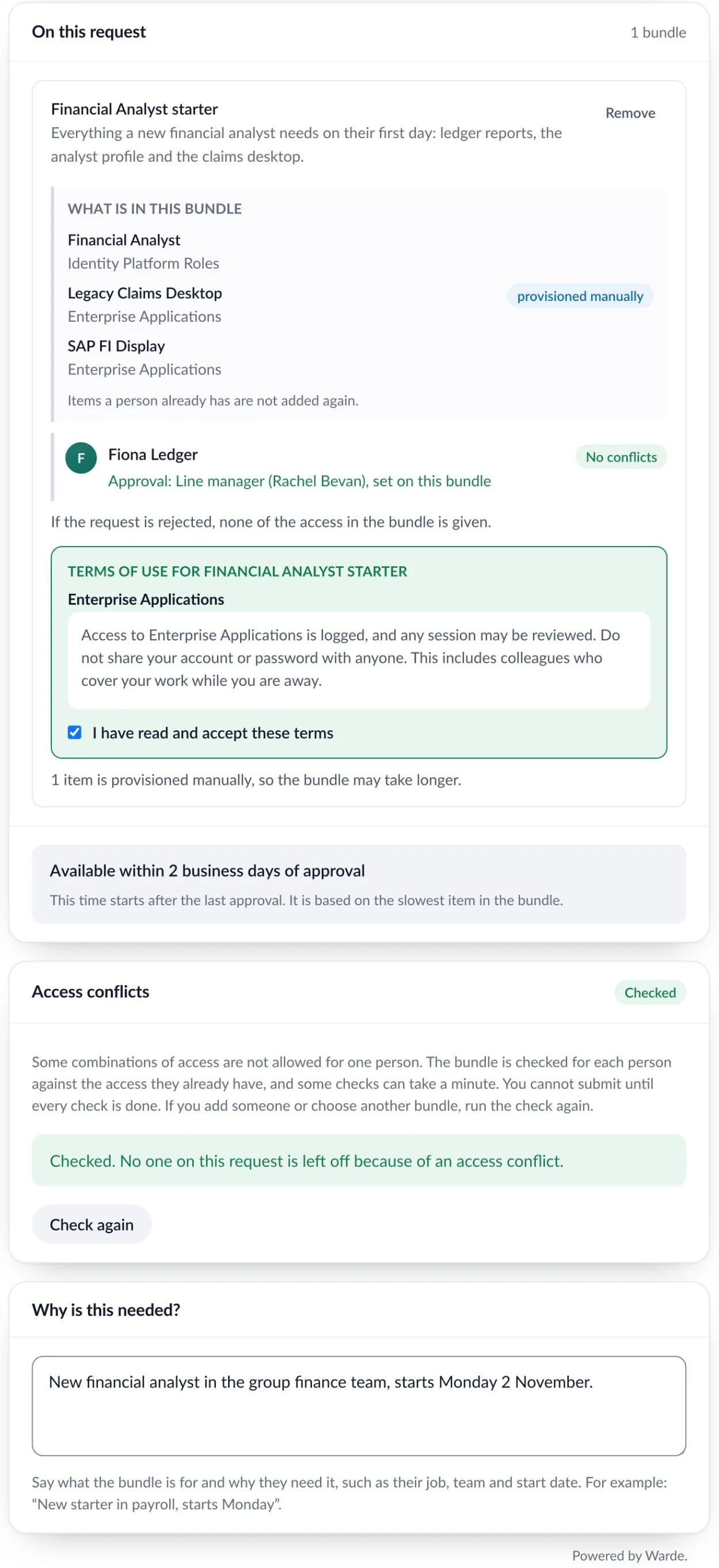
Six requests and eleven approvals become one of each.
A study for NIST found a role project took about 18 months and cost a 10,000-person company US$2.4 million. Bundles get you the same result without the project.
A new starter in accounts payable, without a bundle
6 requests · 11 approvals
- SAP Accounts Payable
- Invoice inbox
- Finance SharePoint
- Accounts payable mailbox
- Finance reports
- GlobalProtect VPN
The same starter, with a bundle
1 request · 1 approval
- Each owner has already said yes
- The manager approves once
- Each item is set up and tracked
- Reviewed later as one decision
For a 10,000-person company, that is about 4,100 fewer approvals and 2,500 fewer requests a year. How we worked it out
The people who know the job build the bundle.
01
Suggest
Anyone who can request access can suggest a bundle, or copy what a person in the job already has.
02
Approve
Each owner approves their own items, once, for this bundle.
03
Switch on
An administrator turns it on, once every owner has said yes.
04
Request
A manager requests it for one starter or ten. One approval covers it all.
Owners approve once. Risky access still asks every time.
One yes per bundle
Once an owner says yes, they aren’t asked again when someone requests the bundle. A new item asks its owner.
Risky access always asks
High-risk and licensed items go to their own approvers on every request. You can mark other items the same way.
Every yes is recorded
Who approved, and when, is kept. An auditor can see why a request needed only the manager.
Everyone can see where their access came from.
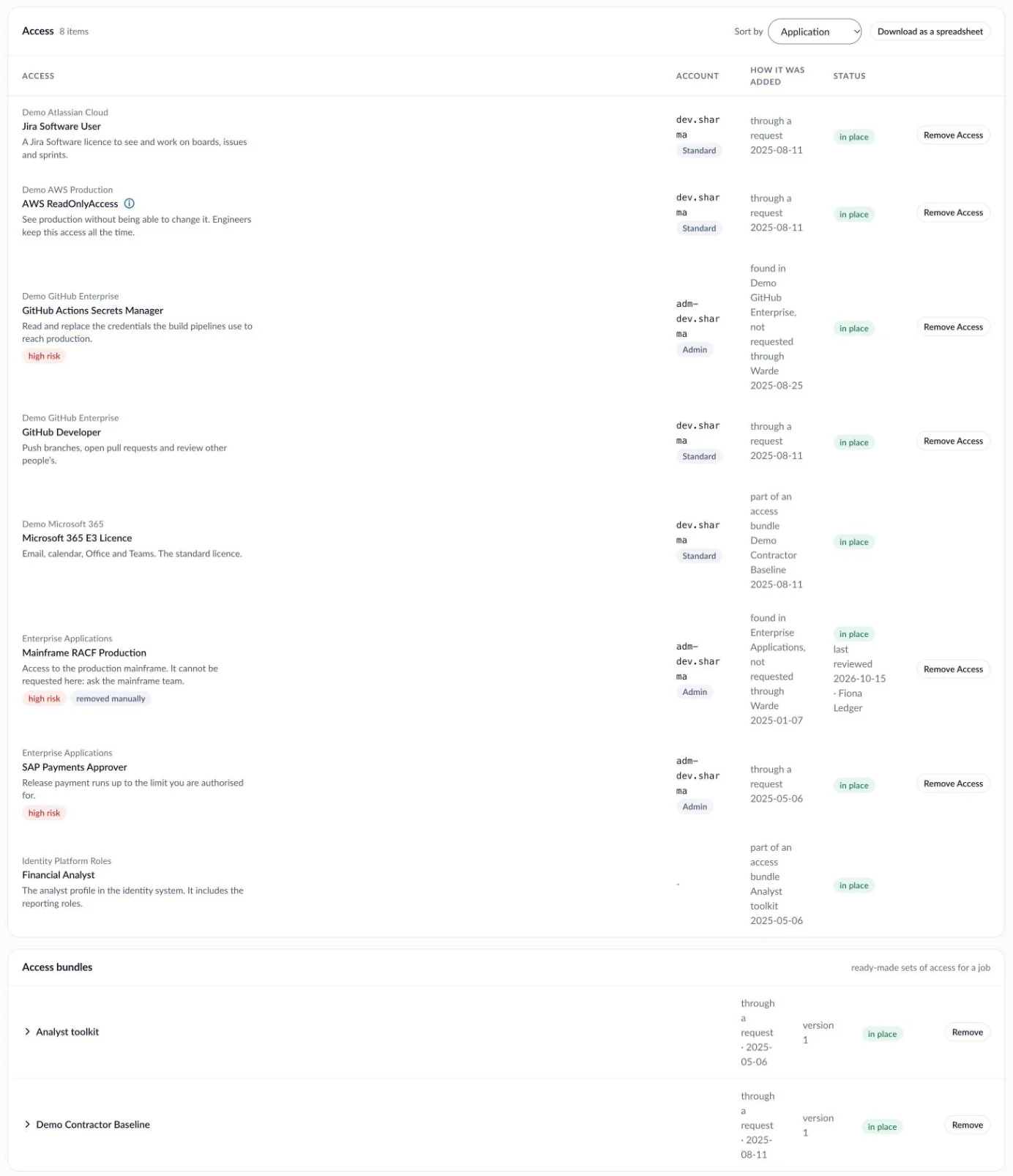
My Access shows the bundle
Each item says which bundle it came with. When a bundle changes, new requests get the new version. People who already have it are updated with a request of their own, so their record shows why.
A reviewer keeps or removes the whole bundle. Removing it takes away only what the bundle gave.
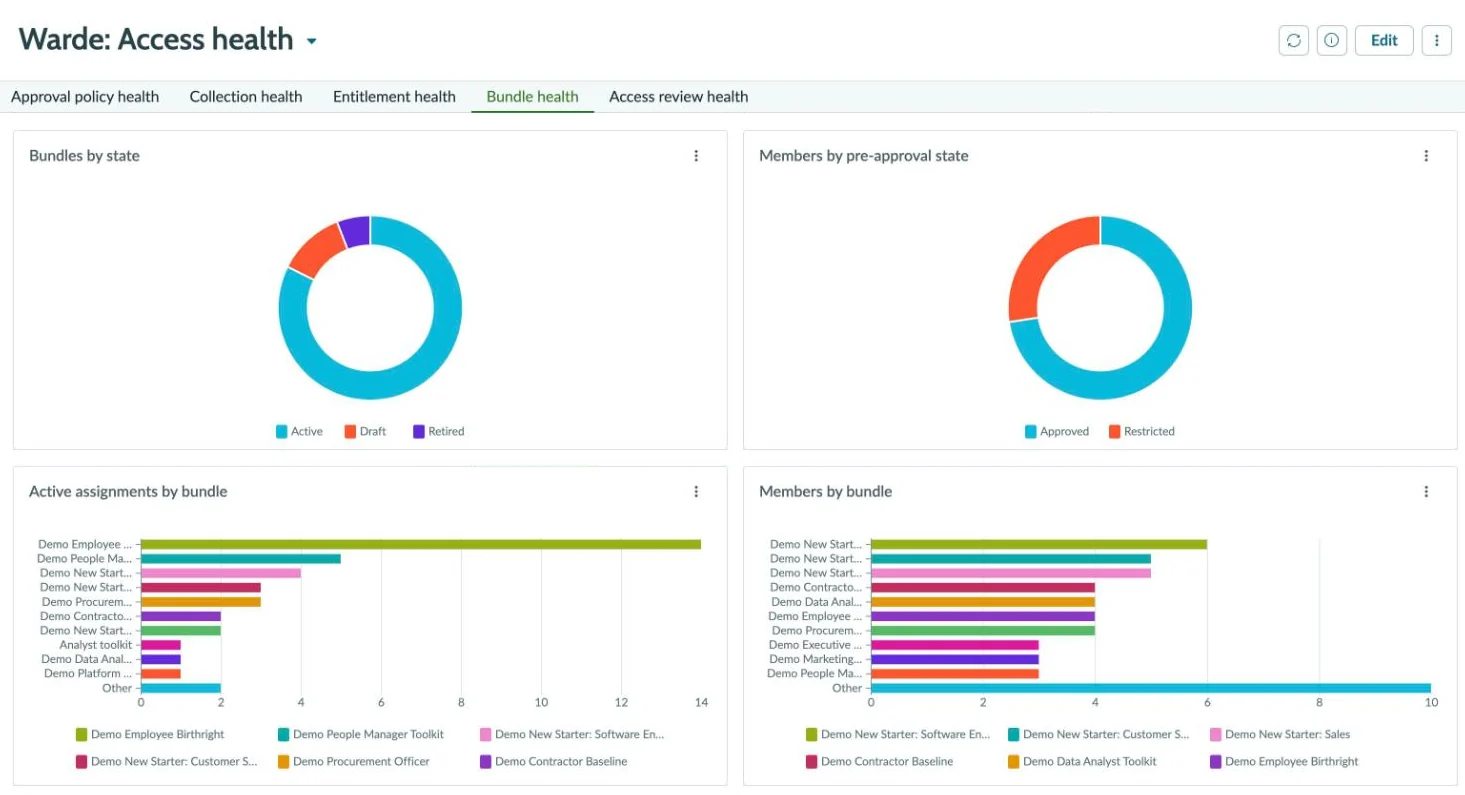
One screen shows what needs fixing
The Admin Workspace lists bundles with no owner, items still waiting on an owner, people on an old version, and bundles nobody has reviewed. Your team builds and changes bundles there, with no developer.
Changing a bundle gets the same sign-off as building it.
Anyone who can request access can suggest a change. Nothing changes until the right people agree.
01
Suggest
Pick the bundle and add or take out items. The request lists only what changes.
02
Take out
The bundle’s owner approves anything coming out. This is settled first.
03
Add
Each new item is approved by that item’s own owner, as when the bundle was built.
04
People who have it
You choose whether people who already hold the bundle get the change. If they don’t, the owner is told how many are on the old version.
What stays out of a bundle, and how one is retired.
- Temporary access stays out, for now
- A bundle is standing access for a job, so access that needs an end date is requested on its own. So is access your identity system already hands out by its own rules. Warde won’t add either, and says why. Coming soon: an end date on a whole bundle, removed in one go when it passes.
- Retiring a bundle
- A retired bundle can’t be requested or handed out again. People who already hold it keep the access until it is removed from them or taken away in a review.
Give bundles out automatically when people join or move.
Start with bundles people request. When one suits everyone in a job, hand it out automatically.
Your HR system or identity platform tells Warde when someone joins or moves, and which bundles they should have. Warde gives them with no approval, because your HR process already approved it. A mover’s old bundle comes off the same way. Joiners, movers and leavers
Questions about access bundles
How is a bundle different from a SailPoint role or an Entra access package?
A bundle lives in ServiceNow and can mix access from several systems, even ones with no identity platform. Each item is still set up by the system that holds it.
Can a bundle have an end date?
Not yet; it is coming soon. A bundle will take an end date per person, and can require one and cap its length, with the whole bundle removed when the date passes. Until then, access that should end is requested on its own, with an end date.
Do we need a role-mining project first?
No. Start with the job your service desk sets up most often. Build its bundle from what someone in that job already has, then do the next one.
Can joiners get bundles automatically?
Yes. Your HR system or identity platform tells Warde which bundles a joiner should have, and Warde gives them with no approval.
What happens to people who hold a bundle when it changes?
They keep what they have until they are updated. You can first ask their managers to confirm they still need it. The update then adds and takes away only what changed, with no approval.
Can someone give up one item from a bundle?
No. A bundle is removed whole, from My Access. A bundle given out by HR can’t be removed by request, because HR would give it straight back. Change the person’s HR details instead.
More of Warde
Bring the access list for your busiest job.
We’ll build its bundle with you on a live instance, and show you the one request that replaces six.
Warde is priced per user. Book a walkthrough or get in touch for a quote.