Warde / MCP and the Warde API
Ask your AI assistant
for access.
Warde ships a REST API and an OpenAPI document for it. Turn it into MCP tools through ServiceNow’s MCP Server Console or a gateway you already run, and people can ask about their access, raise a request and see their reviews from the assistant they use.
What an assistant can do.
Each call does only what the person could do on the request forms in your ServiceNow portal.
- Find the right access
- Search what a person may ask for, with its application, type and risk. Only what their audience and the application’s rules let them see.
- Say what they hold
- List the access a person holds now, and where each of their requests has got to and who it is waiting on.
- Raise a request
- Raise an access request or a bundle request, for themselves or someone they may request for. The form’s checks run first: conflicts, terms of use and the approval chain.
- Find people
- Look someone up by name, login or email, with the department that tells two of one name apart.
- Read their reviews
- List a reviewer’s open review tasks and the lines on each, undecided first.
- Never approve
- The API cannot approve anything. Approvals stay on the platform’s approval record, with the approver’s name on them.
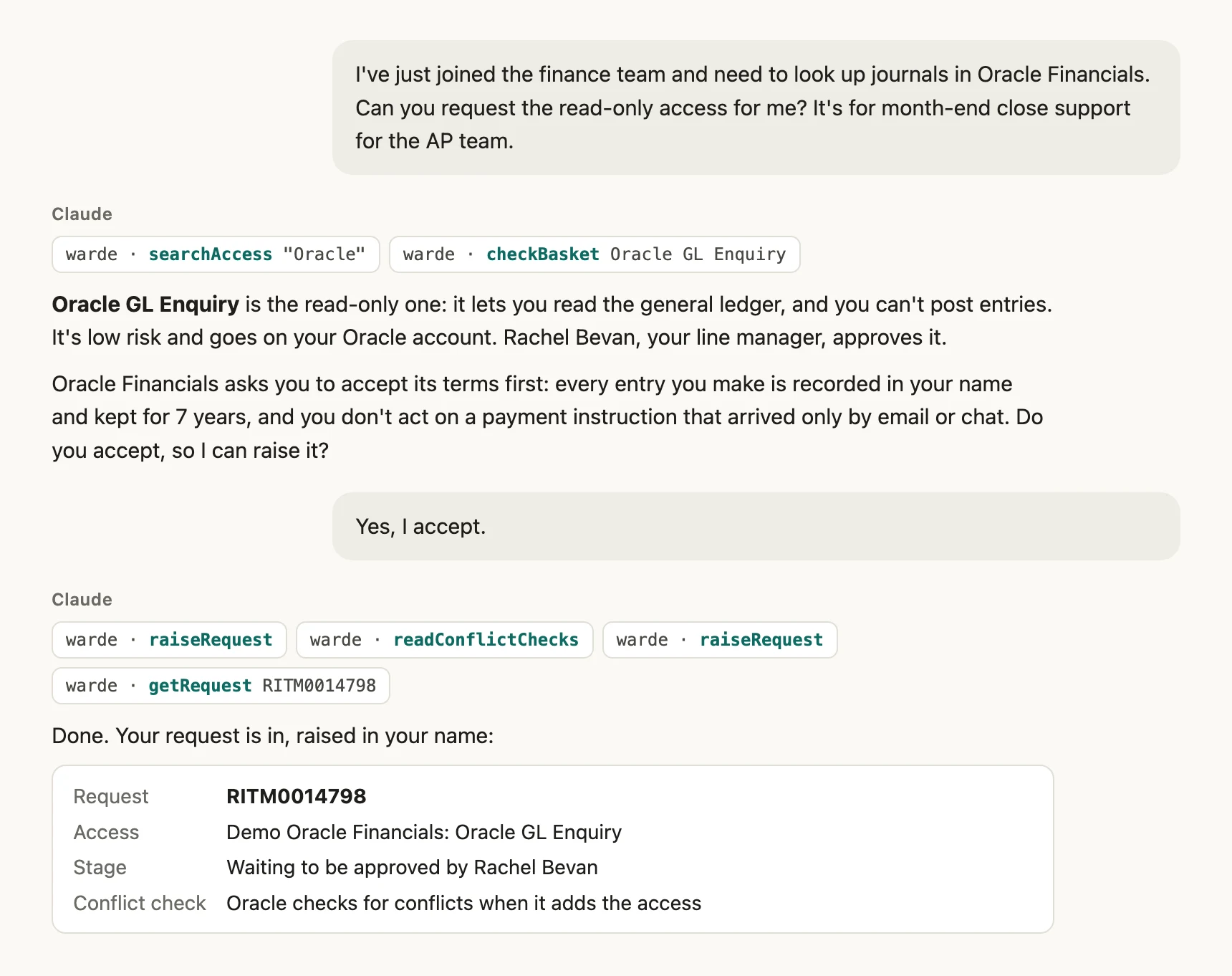
One request, start to finish.
Claude, signed in as a requester on our test instance, connected to Warde’s API through MCP. Every answer came from the instance.
Always as the person signed in.
Their own token
Each call carries the OAuth token of the person signed in to the assistant. Warde refuses to be connected through one shared account.
Their own reach
Whom they may ask for follows the same setting as the request forms. Someone they may not name reads as holding nothing.
A role you grant
Only people with the AI client user role can call it. Start with a pilot group on Guided Setup, and taking the role away stops their calls at once.
The same checks
A request raised through the API is checked again when it is raised, as the form’s own checks are, and approved like any other.
Two ways to connect.
Warde does not run an MCP server. It ships the API, and you choose what turns it into tools.
ServiceNow’s MCP Server Console
The console comes with Now Assist and connects the assistant straight to your instance. You create one tool for each Warde resource, with the description the guide gives you to paste.
An MCP gateway you already run
Any MCP server or gateway that can call a REST API. No Now Assist licence needed, and its sign-in can be limited to Warde’s API alone.
Virtual Agent, too.
If you have Now Assist for Virtual Agent, Warde ships Request Access (Simple): a conversational version of the request form that asks for one item for one person, a turn at a time. It ships off. Switch it on once Now Assist and AI Search are set up to find it, and the portal does not change.
Questions about MCP and the API
Do we need Now Assist?
No. Warde works the same without it. ServiceNow’s MCP Server Console needs it, and an MCP gateway of your own does not.
Which assistants work with it?
Any assistant that speaks MCP, such as Claude. The assistant only sees the tools you create from the API.
Can the assistant approve access or decide a review?
No. Approvals stay with the approver in ServiceNow, and reviews are decided in the portal.
Is the API documented?
Yes. An OpenAPI document describes every route, parameter and answer, and the setup guide gives each tool its description to paste.
What does it cost?
Nothing extra. The API is part of Warde.
More of Warde
See an assistant raise a request, start to finish.
We’ll connect one on a live instance, signed in as a requester, with no slides.
Warde is priced per user. Book a walkthrough or get in touch for a quote.